Audit log
What the workspace audit log records, how to read an event, and how to use it to answer who changed what and why a request was denied.
The audit log is a durable, read-only record of workspace operations and authorization decisions, shown newest first under Settings › Audit log.
Prerequisites
- The
workspace.audit.readpermission. Owners and Administrators have it; Members and Viewers do not, and the Settings entry is hidden for them.
What an event records
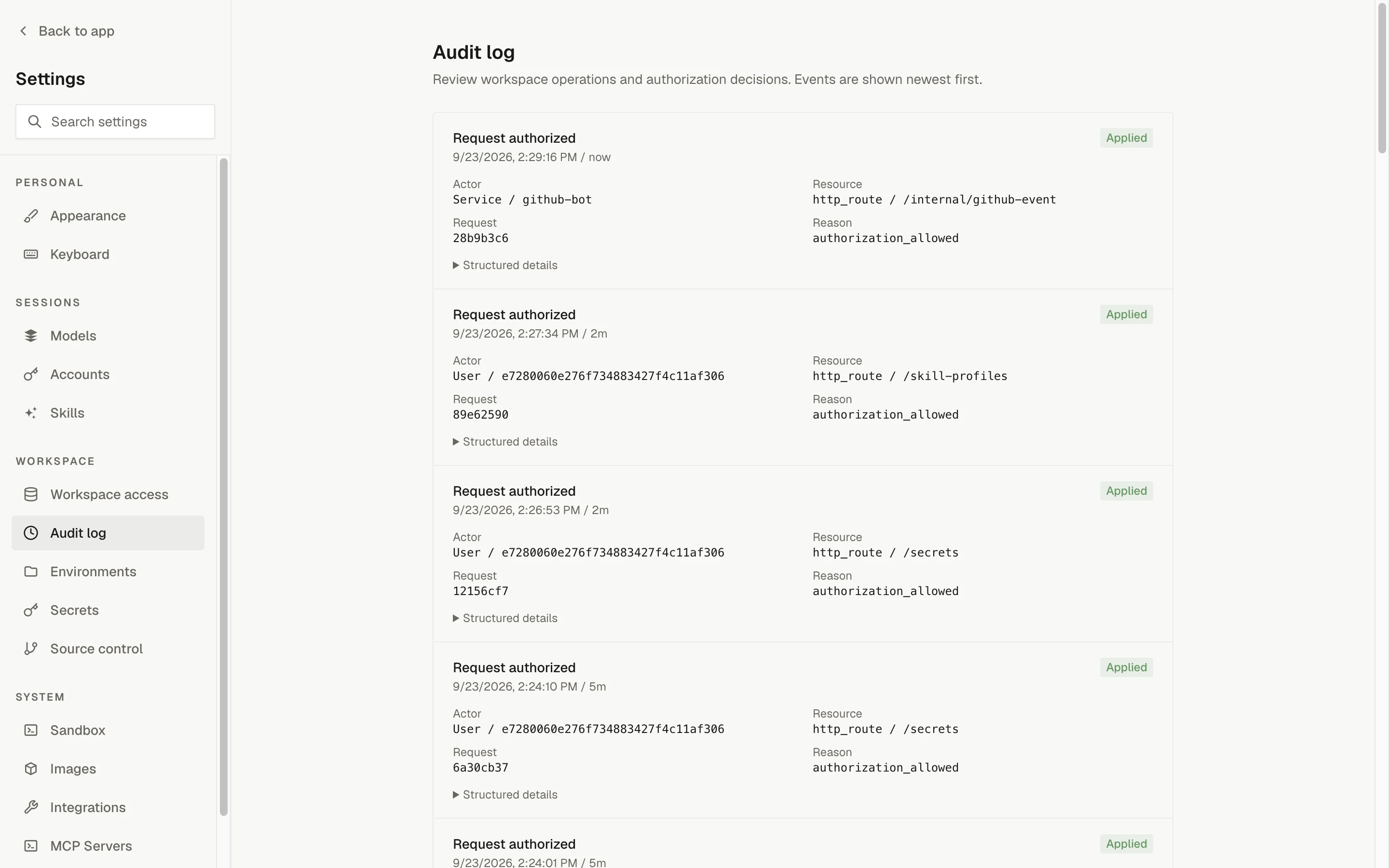
Each event is shown as a card with the action as its heading, the local timestamp and relative time beneath it, and an outcome badge on the right. The card lists four fields, plus a Structured details expander with the raw event ID, action, principal kind, and metadata.
| Field | What it contains |
|---|---|
| When | The time the event occurred, shown in your local time and as a relative time. |
| Request | The request ID of the HTTP request that produced the event. Use it to correlate with support reports and logs. |
| Principal kind | user, service, or sandbox: whether a signed-in person, a bot or operator tool, or a session sandbox acted. |
| Actor | A snapshot of the acting user ID, the acting service, or both (a service acting on behalf of a user shows both). |
| Action | The operation, for example workspace.member_role_updated. |
| Resource | The resource type and, when there is one, its ID (for example user / <id> or http_route / /sessions). |
| Target user | The user the operation was about, appended to the resource as Target user <id> when present. |
| Reason | A short reason code, such as member_role_updated, member_status_unchanged, or the denial code for a refused request. |
| Outcome | Applied, No change, Denied, or Rejected. |
| Metadata | Structured details specific to the action, shown as JSON under Structured details. |
Actor and target values are snapshots taken when the event was written. They do not change if the user is later renamed or merged.
Which operations are recorded
The control plane writes these event families today:
| Action | Shown as | When it is written |
|---|---|---|
workspace.member_role_updated | Member role updated | A member's role is changed from Settings › Workspace access. Outcome is Applied, or No change with reason member_role_unchanged when the role was already set. Metadata records the role before, requested, and after. |
workspace.member_status_updated | Member status updated | A member is suspended or restored. Outcome is Applied, or No change with reason member_status_unchanged. Metadata records the suspension state before, requested, and after. |
authorization.request_denied | Request denied | An authenticated request was refused by authorization. The resource is the HTTP route, the reason is the denial code, and metadata includes the HTTP method, path, status, the permission that failed, and the principal's effective permissions. |
authorization.request_allowed | Request authorized | A request passed authorization on a route gated by a management permission (automations, environments, secrets, integrations, MCP servers, provider accounts, source control settings, session lifecycle and archive, skills, member management, ownership transfer, and similar), and on every route reserved for a bot service (the GitHub and Slack bots' automation-event deliveries). Ordinary reads are not recorded. |
workspace.owner_bootstrapped | (raw action name) | An operator ran the Owner bootstrap command. The principal is service, the actor is operator-cli, and the target user is the new Owner. |
Actions without a friendly label are shown by their raw name.
Reading the log
Events are listed newest first, 25 per page. The page has no filter, search, or export, and no retention period is stated. Use Previous and Next to move between pages; the current page number is shown between the buttons. After changing pages the list scrolls back to the heading.
When there are no events, the page shows "No audit events yet" with the note "Workspace activity will appear here as it is recorded."
If a refresh fails while events are already loaded, a banner reads "Unable to refresh the audit log. Showing the most recently loaded events." with a Retry button. If the first load fails, the page shows "Unable to load the audit log." with Retry.
Typical uses
Who changed a role. Look for Member role updated events. The Actor is the person who made the change, the Resource line names the target user, and Structured details shows the role IDs before and after.
Why a request was denied. Look for Request denied events. The Reason field carries the denial code; Structured details shows the HTTP method and path, the permission that was required, and the permissions the principal actually had.
Correlating with a support request. Ask the person for the request ID from the error they saw, then match it against the Request field. Every event carries the request ID of the call that produced it.
Confirming an Owner bootstrap. After an operator runs the bootstrap command, a workspace.owner_bootstrapped event with actor operator-cli appears with the new Owner as the target user.