Automation templates
Start an automation from a pre-filled template in the Templates gallery, then adjust the repository, model, and instructions before saving.
The Templates gallery pre-fills the Create Automation form with a working trigger and instructions so you can start from an idea instead of a blank form.
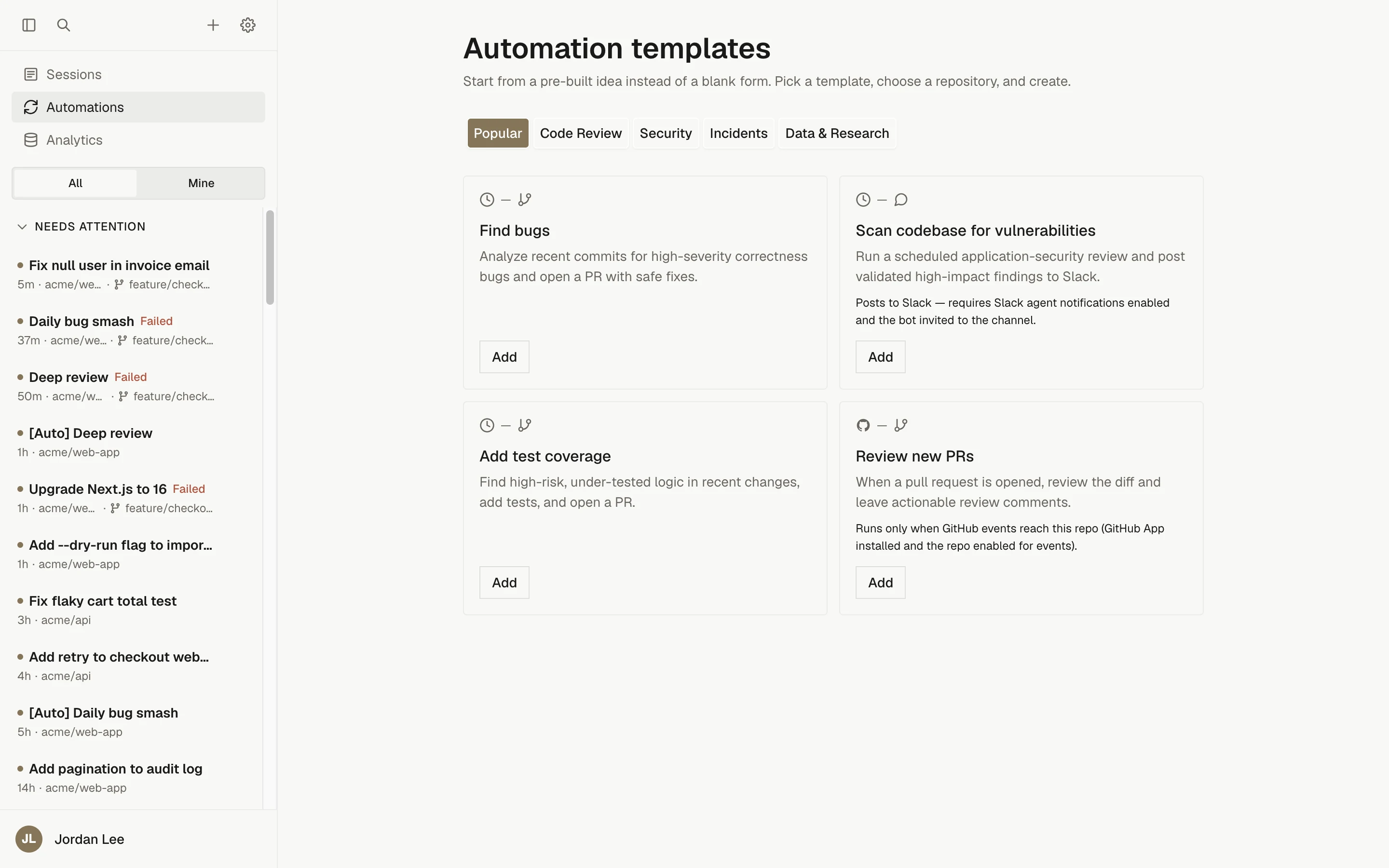
Opening the gallery
Open Automations in the sidebar and click Browse templates (the page is Automations › Templates). The gallery is available to anyone who can create automations; Viewers are redirected back to the list.
Filter the cards by category with the buttons at the top. Each card shows the trigger type, the primary output (a pull request or a Slack post), a description, and a setup note when the template needs configuration beyond picking a repository. Click Add on a card to open the create form with the template applied.
What a template pre-fills
A template fills in the Name, Trigger Type, Instructions, and, depending on the template, the schedule, event type, conditions, model, and reasoning effort. It never selects a repository, never sets a timezone (the form's default applies), and never creates or runs anything by itself; you still review the form and click Create Automation.
If a template suggests a model that is not enabled in Settings › Models, the form switches to an enabled model the harness can run.
Templates
| Template | Category | Trigger | What it does |
|---|---|---|---|
| Find bugs | Popular, Code Review | Schedule, daily at 9:00 AM | Reviews the last day's commits for high-severity correctness bugs and opens one PR with safe, minimal fixes; opens nothing if it finds none. |
| Scan codebase for vulnerabilities | Popular, Security | Schedule, Mondays at 9:00 AM | Runs an application-security review for exploitable issues and posts validated medium, high, and critical findings to the #security Slack channel. Suggests a stronger model with high reasoning. |
| Add test coverage | Popular, Code Review | Schedule, Mondays at 9:00 AM | Finds high-risk, under-tested logic, adds focused tests that pass, and opens a PR. |
| Review new PRs | Popular, Code Review | GitHub Event, PR Opened | Reads the PR diff with the GitHub CLI and posts an actionable review on the existing PR. |
| Generate docs | Code Review | Schedule, Mondays at 9:00 AM | Creates or updates developer docs for recently changed or under-documented code and opens a PR. |
| Investigate Sentry issues | Security, Incidents | Sentry, New error | Traces a new Sentry error to its root cause and opens a fix PR, or a PR with a written root-cause analysis when a safe fix is not possible. |
| Triage failed CI | Incidents | GitHub Event, Check Suite Completed with Conclusion failure | Reproduces the failing build locally, diagnoses the likely cause, and posts a summary to the #ci-alerts Slack channel. |
| Auto-triage Slack reports | Incidents | Slack Message, text regex for bug, broken, error, failing, down, incident | Treats a matching channel message as a bug report, investigates it against the repository, and replies in the thread. You must add the Slack Channel condition yourself. |
| Weekly dependency digest | Data & Research | Schedule, Mondays at 9:00 AM | Inspects outdated packages, advisories, and changelogs, and posts a read-only digest to the #dependencies Slack channel. |
Categories are Popular, Code Review, Security, Incidents, and Data & Research.
Setup notes shown on cards
| Template | Note |
|---|---|
| Scan codebase for vulnerabilities, Weekly dependency digest | Posts to Slack; requires Slack agent notifications enabled and the bot invited to the channel. |
| Review new PRs | Runs only when GitHub events reach this repository (GitHub App installed and the repository enabled for events). |
| Investigate Sentry issues | Requires a Sentry client secret at creation and completing the Sentry webhook setup shown afterward. |
| Triage failed CI | Requires GitHub events for this repository and Slack agent notifications enabled with the bot in the channel. |
| Auto-triage Slack reports | Requires Slack triggers enabled, the bot invited to the channel, and a channel id filled into the Slack Channel condition. |
Customizing after choosing a template
After clicking Add, the create form opens with the template applied. Before saving:
- Select the Repository Configuration and, for a single repository, the Branch. Templates never choose these for you.
- Check the Agent, Model, and Reasoning Effort, and set provider authentication pins if you need them.
- Edit the Instructions. Slack-posting templates name a channel such as
#security; change it to the channel you use. Review templates assume the GitHub CLI is available in the sandbox. - For schedule templates, adjust the Schedule and Timezone; the default cadences are conservative to limit recurring cost.
- For event templates, confirm the Event Type and add or adjust Conditions. The Slack template needs at least one Slack Channel condition before it can be saved.
- Click Create Automation, then use Trigger Now to test.
Everything a template sets can be changed later with Edit, except the trigger type.
Troubleshooting
| Symptom | Cause | Fix |
|---|---|---|
| Opening the gallery sends you back to the Automations list | Your role cannot create automations (Viewers cannot) | Ask an Owner or Administrator for the Member role; see Workspace access |
| The Slack template will not save | "Slack triggers require at least one Slack Channel condition." | Add a Slack Channel condition with the channel to watch |
| The form shows a different model than the template suggests | The suggested model is not enabled under Settings › Models, so the form picked an enabled one the harness can run | Keep the substitute, or enable the suggested model under Settings › Models and select it |