Provider accounts and API keys
Connect ChatGPT, SuperGrok, and Claude subscriptions as installation-wide provider accounts, set defaults for unattended sessions, and manage account lifecycle.
This page shows you how to authenticate model providers with either an API key or a connected subscription account, and how those accounts behave across sessions, automations, and their lifecycle.
Two ways to authenticate a provider
| Mode | How it is configured | Where it applies |
|---|---|---|
| API key | Add the provider's key as a global, repository, or environment secret under Settings › Secrets (ANTHROPIC_API_KEY, OPENAI_API_KEY, XAI_API_KEY, and the opt-in provider keys). | Every provider. The only option for OpenCode Zen, OpenCode Go, Z.AI Coding Plan, and DeepSeek. |
| Connected account | Connect a subscription under Settings › Accounts (provider accounts). Credentials stay in the control plane, encrypted and write-only. | OpenAI (ChatGPT) and xAI (SuperGrok) on OpenCode sessions; Anthropic (Claude) on Claude Agent sessions only. |
Provider accounts are installation-wide: every admitted user can select them, and they are not scoped to a repository or private to whoever connected them. Viewing the page needs provider_accounts.read; connecting and managing accounts needs provider_accounts.manage.
Prerequisites
- The
provider_accounts.managepermission (Owner or Administrator). - A subscription that is entitled to the models you plan to enable. Entitlement is decided by the provider, not by OpenInspect.
- For Grok models, the xAI / SuperGrok group enabled under Settings › Models. See Choosing a model.
Connect an account
Open Settings › Accounts (provider accounts) and choose Add account, then the subscription to connect.
Device authorization starts as soon as you choose ChatGPT.
- Use Open ChatGPT Settings and enable device code authorization for Codex.
- Use Open Device Authorization to open OpenAI's device page.
- Enter the code shown in the dialog when OpenAI asks for it (there is a copy button next to it).
- Keep the dialog open while OpenInspect waits for authorization. The account appears once OpenAI confirms the connection.
The account is created as ChatGPT account. Use Rename afterwards if you want a different name.
Account list
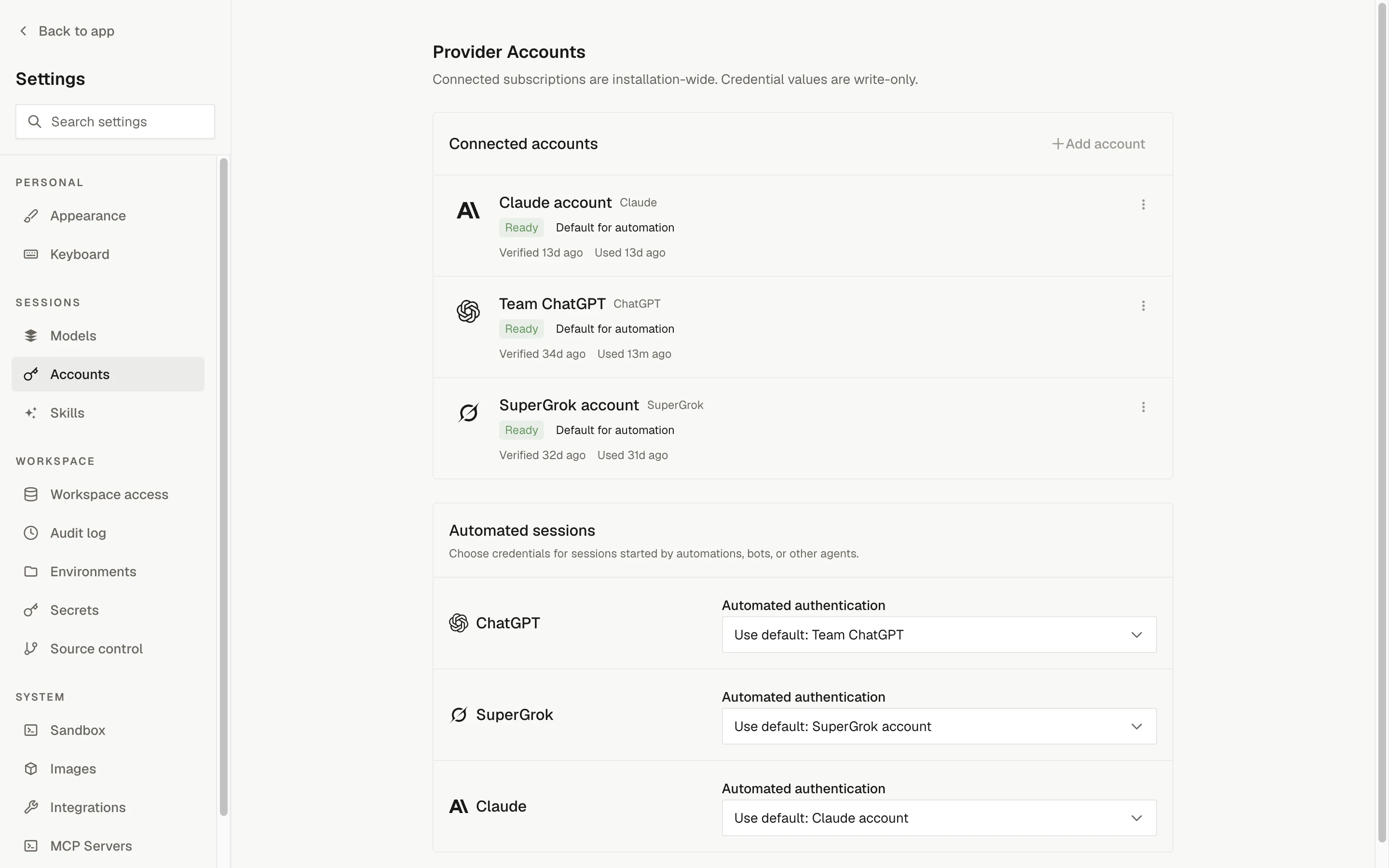
Each connected account shows its name, subscription, a status badge (Ready, Reconnect required, or Disabled), a Default for automation badge when it is the provider default and automated sessions use it, and when it was last verified and last used.
Default account and automated sessions
Each provider can have one default account. Choose Make default on an active account. The default is what an interactive session uses when its authentication selector is left on the provider policy.
The Automated sessions section sets, per provider, the Automated authentication used by sessions started by automations, bots, and other agents (this is the provider's unattended mode):
| Option | Effect |
|---|---|
Use default: <account> | Slack, GitHub, Linear, and unpinned automation runs use the default account. |
| No account (API key) | Unattended launches keep using the API key from secrets. |
Until a provider has a default the section reads No default account selected.
Defaults are resolved when a session starts. Changing a default never moves an existing session to a different account.
Anthropic defaults reach only Claude Agent
A default Claude account applies to Claude Agent sessions and Claude Agent automations. Slack,
GitHub, and Linear launches run on OpenCode, which uses ANTHROPIC_API_KEY. Set Automated
authentication for Claude to No account (API key) if you want automations on the platform
key while interactive Claude Agent sessions pick the account.
Select authentication per session
When you create a session with an OpenAI, xAI, or Anthropic model, the composer's Session options menu has an authentication entry for that provider with three kinds of choice:
| Choice | Meaning |
|---|---|
Use default: <account> (provider policy) | Follow the provider default at create time. Shown as Use default when there is no default. |
| A named account | Pin that active account for the session. |
| No account | Use API-key mode: the provider's key from the session's secret scope. |
The choice is fixed when the session is created. Child sessions inherit their parent's pinned authentication. A harness that cannot use accounts for the provider offers none: on OpenCode the Anthropic control reads OpenCode runs Anthropic on its API key; connected accounts are not offered.
Select authentication per automation
The automation editor has a Provider authentication section with the same control for every subscription provider, labeled Use defaults when each run starts:
- Leave it on Use defaults when each run starts to resolve the current default and automated-authentication setting on every run.
- Choose an account or No account to pin that choice for future runs.
Pins are retained when the configured model changes and apply only to future sessions. Switching the automation's harness drops any pin the new harness cannot honor. See Your first automation.
What account mode does to the sandbox
- The provider's API key (
OPENAI_API_KEY,XAI_API_KEY, orANTHROPIC_API_KEY) and any legacy OAuth fields for that provider are removed from the sandbox environment, so the runtime cannot bypass the selected subscription. Only a non-secret managed marker is injected. - The sandbox requests short-lived access from the control plane using its own sandbox credential. For OpenAI and xAI the control plane refreshes the stored credential and returns only a short-lived access token; for Claude it returns the setup token, which the harness keeps in process memory.
- Refresh tokens never enter the sandbox and are never returned to the browser. Broker responses are marked
no-store. - API-key mode is unchanged: the sandbox receives ordinary global, repository, or environment secrets.
In account mode the credential exchange looks like this:
Lifecycle actions
Actions live in each account's More actions menu.
| Action | When offered | Effect |
|---|---|---|
| Verify | ChatGPT and SuperGrok accounts that are Ready | Checks the stored credential against the provider and updates Verified. Not offered for Claude accounts. |
| Reconnect | Any account (a button on Reconnect required accounts) | Repeats the connection flow and replaces the stored credential. Keeps the name and, for ChatGPT, must authenticate the same OpenAI identity. Bound sessions carry on. Reconnecting a disabled account reactivates it. |
| Make default | Active accounts that are not the provider default | Makes this the provider default. |
| Rename | Any account | Changes the display name. |
| Copy account ID | Accounts with a recorded external identity | Copies the provider's account id. |
| Disable | Active accounts | Stops new sessions and new access hand-outs. Shown as Disabled; Enable restores it. |
| Enable | Disabled accounts | Returns the account to Ready. |
| Archive | Any account | Retires the account permanently. It cannot be reconnected. |
Before Disable or Archive, the confirmation warns that running sessions may retain issued access until it expires (for Claude, until the sandbox exits) and that defaults and pinned automations that reference the account must be updated first. A provider's default account cannot be disabled or archived; reconnect it in place or choose Make default on another account first.
Effect on sessions bound to the account:
- Running turn: finishes on the access it already holds. Disabling or archiving blocks future broker calls, but a token already issued to a running sandbox remains usable until it expires or the sandbox exits.
- Next prompt: a disabled or Reconnect required account fails the prompt with reconnect guidance; an archived account fails it with guidance to start a new session with another account or an API key.
- Reconnect: nothing fails; the next sandbox start fetches the new credential.
For Claude accounts, reconnecting, disabling, and archiving change only what OpenInspect stores. Revoking the token itself happens at Anthropic.
Legacy scoped OAuth
Sessions created before provider accounts can remain pinned to legacy scoped OpenAI or xAI OAuth stored as secrets. Both systems coexist: existing sessions keep their legacy binding, and a provider default affects only sessions created afterwards. When a new session has no explicit choice and no provider default, it keeps the legacy behavior, with the API key as the fallback when no legacy refresh token resolves.
Settings › Accounts (provider accounts) lists remaining legacy key locations under Legacy OAuth credentials, across global, repository, and environment scopes:
OPENAI_OAUTH_REFRESH_TOKEN
OPENAI_OAUTH_ACCESS_TOKEN
OPENAI_OAUTH_ACCESS_TOKEN_EXPIRES_AT
OPENAI_OAUTH_ACCOUNT_ID
XAI_OAUTH_REFRESH_TOKEN
XAI_OAUTH_ACCESS_TOKEN
XAI_OAUTH_ACCESS_TOKEN_EXPIRES_AT
Remove them only after the legacy-bound sessions that depend on them are no longer needed, and never copy the same rotating refresh token into both systems. A SuperGrok account created before device authorization has no bound identity; its Reconnect asks for a fresh xAI refresh token once.