Prebuilt images
Enable prebuilt images for a repository or an environment so sessions start from an artifact that already has the code and dependencies in place.
This page explains what a prebuilt image contains, how to enable one for a repository or an environment, what the statuses mean, when images are rebuilt, and what a session does with one.
Why prebuilt images
Without one, every new session has to clone the repositories, install dependencies, and run .openinspect/setup.sh. For a large repository that takes anywhere from 30 seconds to several minutes. A prebuilt image does that work ahead of time and keeps the result as a provider artifact. A new session starts from the artifact and only pulls the commits pushed since it was built.
One image-build subsystem serves two kinds of scope:
| Scope | What is built | Where you enable it |
|---|---|---|
| Repository | A one-repository set on its default branch | Settings › Images |
| Environment | The environment's ordered set of up to 10 repositories at their base branches | The Prebuild images toggle on the environment |
From trigger to session start, an image moves through these states:
Where the artifact lives
The artifact is stored by the deployment's sandbox provider:
| Provider | Artifact |
|---|---|
| Modal | Modal image |
| Vercel Sandboxes | Vercel snapshot |
| OpenComputer | Checkpoint |
| E2B | Snapshot |
| Daytona | Snapshot. Requires the operator to open prebuild admission first. While it is closed, Settings › Images and Settings › Environments show "Prebuilds are paused for this deployment. Existing images keep working; new builds start once an operator enables them." Toggles still record intent, and the rebuild button is disabled. |
You cannot change the provider yourself; see Sandbox providers.
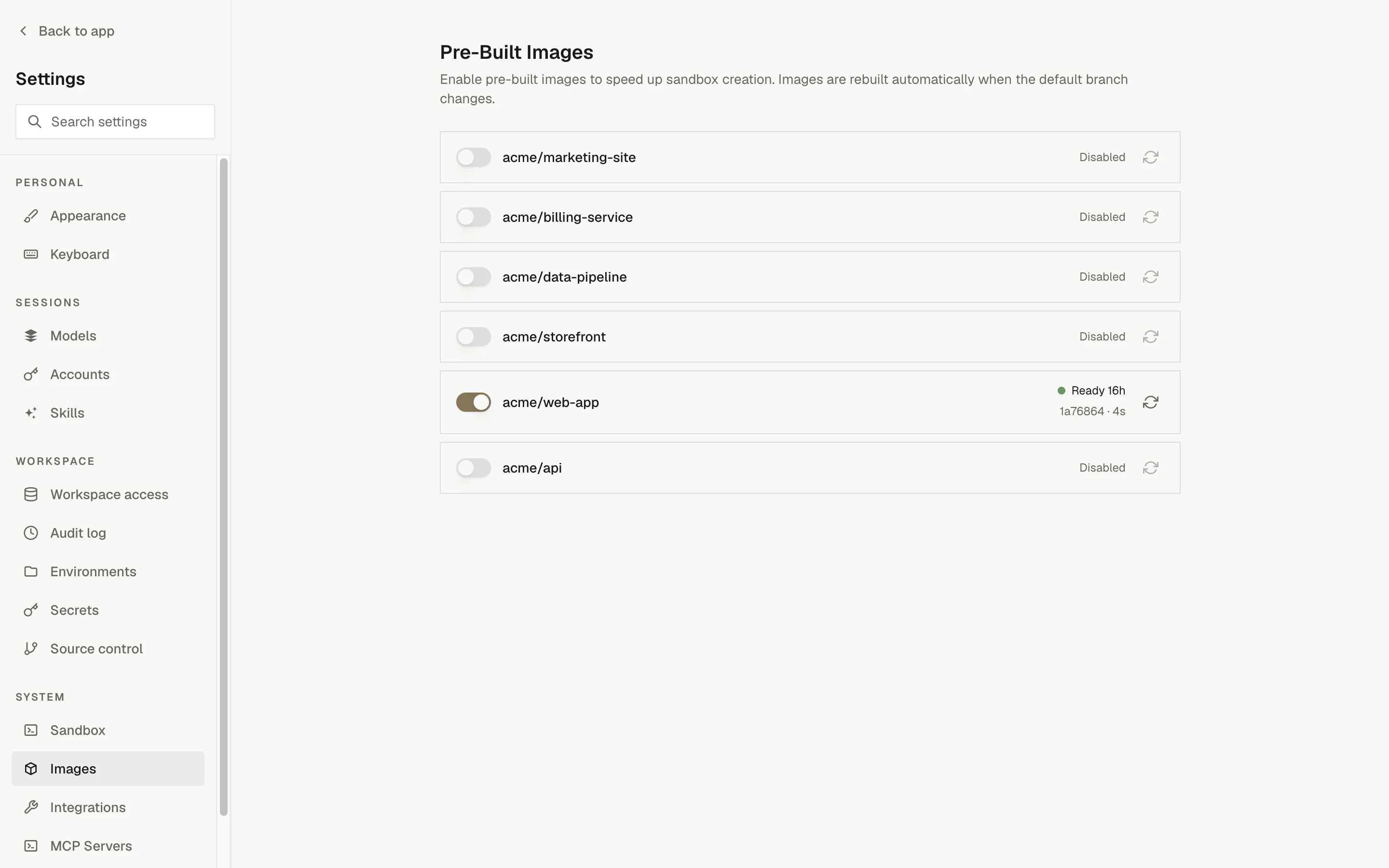
Enable prebuilt images
For a repository
- Open Settings › Images.
- Find the repository.
- Turn on its toggle.
The first build starts immediately. Repository images are built for the default branch only. You need the repositories.images.manage permission to change toggles or trigger builds.
For an environment
- Open Settings › Environments and create or edit the environment.
- Turn on Prebuild images.
- Save.
Saving with the toggle on starts the first build. The environment row also has a Rebuild image button. The toggle needs environments.manage; the rebuild button needs environments.images.manage.
Statuses
Settings › Images (for repositories) and each environment row (for environments) show the latest build of the scope:
| Status | Meaning | What the row shows |
|---|---|---|
| Ready (green) | An image is available. | When it was built, the primary repository's commit, and the build duration. |
| Building (amber, pulsing) | A build is in progress. | When the build started. |
| Failed (red) | The last build failed. The scheduler retries on its next run. | The error message; hover it to read the full text. |
| No image | Prebuilds are enabled but no build has completed yet. | Nothing else. |
| Disabled | Prebuilds are off for this scope. | Nothing else. |
| Status unavailable | The environment has prebuilds on but the build feed could not be loaded. | Nothing else. |
Picker annotations
The new-session picker annotates prebuild-enabled repositories and environments so a broken prebuild is visible where you launch sessions:
| Annotation | Meaning |
|---|---|
prebuilt | An image matching the current repository set is ready. |
prebuild building | A build is in progress. |
prebuild failed | The last build failed. |
prebuilds on | Enabled, but no build has completed for the current set yet. |
Options with prebuilds disabled carry no annotation. A repository's annotation reflects its default-branch image and does not change when you pick a different branch in the picker.
When images are rebuilt
Every image records the ordered repositories and base branches it was built for, the commit each repository was built at, and the sandbox runtime version. A scheduler runs every 30 minutes and rebuilds a scope when:
- there is no current image (just enabled, the repository set or a base branch was edited, or the previous build failed);
- any repository's branch tip has moved since the ready image was built;
- the image was built on a sandbox runtime older than the current rebuild floor.
Builds also start immediately, outside the schedule, when you:
- enable prebuilds for a repository;
- save a prebuild-enabled environment;
- change an environment's secrets (this also retires the existing ready image before the rebuild, so a rotated value cannot keep serving);
- click the rebuild button next to a repository in Settings › Images or on an environment row.
Only one build runs per scope at a time. A trigger while a build is in flight does nothing. On a Daytona deployment every trigger, including the scheduler, starts a build only while admission is open.
What a build does
- Clones every repository in the scope at its base branch (concurrently for an environment).
- Runs each repository's
.openinspect/setup.sh, if present, one after another in position order, so a later repository's setup can rely on an earlier one's. - Refreshes OpenCode's model catalog, so sessions from the image resolve models as of the build. This step is best-effort; a failure is logged and the build continues.
- Saves the sandbox as the provider artifact.
A failing setup.sh fails the whole build, and for environment builds the error names the repository. .openinspect/start.sh does not run in a build. Build-time secrets are exactly what the scope's sessions get: global plus repository secrets for a repository, global plus environment secrets for an environment.
Everything the setup scripts install (dependencies, build artifacts, caches) is captured in the artifact. See Repository lifecycle scripts.
Timeouts
| Bound | Value |
|---|---|
| Build timeout | The scope's resolved build-timeout sandbox setting (buildTimeoutSeconds): global defaults, overridden by the primary repository's settings and, for environments, the environment's own overrides. Default 30 minutes. Covers clone and setup. |
| Ceiling | One hour, whatever the setting says. |
| Vercel | Execution is capped at 35 minutes, because Vercel limits sandbox lifetime to 45 minutes. |
| Finalization reserve | Build sandboxes get an additional ten minutes for callback delivery and snapshot or checkpoint finalization. |
Do not worry much about build duration. Builds run in the background and sessions always get the last successfully built image. A 10-minute build is worthwhile if it saves 10 minutes on every session start.
What happens at session start
A session boots from the ready image when the image's repository set matches the session's own: same repositories, same order, same base branches. For a single-repository session that means the default branch.
- The sandbox starts from the saved artifact, with code and dependencies already present.
- A fast git sync pulls the commits pushed since the build, per repository.
setup.shis skipped. No "Running setup.sh" phase appears.start.shruns for per-session startup. If it exists and fails in the primary repository, startup fails instead of continuing with a broken runtime.- Managed skills are installed and the agent starts.
If no matching ready image exists (disabled, first build not finished, no successful build yet, a non-default branch selected, or the environment edited after the image was built), the session falls back to the normal startup flow. A failed rebuild does not retire the image it was replacing: an older ready image that still matches keeps serving sessions until a newer build succeeds. If the saved artifact itself fails to restore, the image is marked failed and the session retries from the base image. You are never blocked from starting a session.
Ad-hoc multi-repository sessions never use prebuilt images
Picking Multiple repositories in the new-session picker always does a full clone plus setup for each repository, even if an environment with the same repositories exists. Save the set as an environment and enable prebuilds there.
Secrets and images
Image builds run setup.sh with the same secrets a session would get. Anything the script persists to disk (an .npmrc, a .env file, a downloaded credential) is captured in the image and re-served to every session that boots from it, even after you rotate the secret.
- Read secrets from the environment at runtime instead of writing them into files during setup. They are injected fresh on every session.
- Changing an environment's secrets invalidates that environment's image automatically and triggers a rebuild, so a revoked value cannot keep serving from an old image.
- Rotating repository or global secrets does not invalidate images. Stale on-disk material persists until the next commit-triggered rebuild.
OpenInspect's own build plumbing never writes a credential into the image; what a setup script does with the values in its environment is the script's decision. Treat a scope's prebuilt image as no less sensitive than the scope's secrets.
Optimizing setup.sh
The more work you front-load into .openinspect/setup.sh, the faster sessions start:
- Install all dependencies (
npm install,uv pip install --python python3 -r requirements.txt,bundle install). - Run build steps (
npm run build,cargo build, code generation, compiled assets). - Warm caches, for example by running the test suite once.
- Pre-download large resources such as models or datasets.
Troubleshooting
Toggling prebuilds off returns new sessions to the normal startup flow. Existing sessions are not affected.