Source control settings
Set draft-mode and label defaults for pull requests, override them per repository, and configure commit signing for agent commits.
Source control settings decide how pull and merge requests opened by sessions look (draft or ready, labeled or not) and how the commits behind them are attributed and signed.
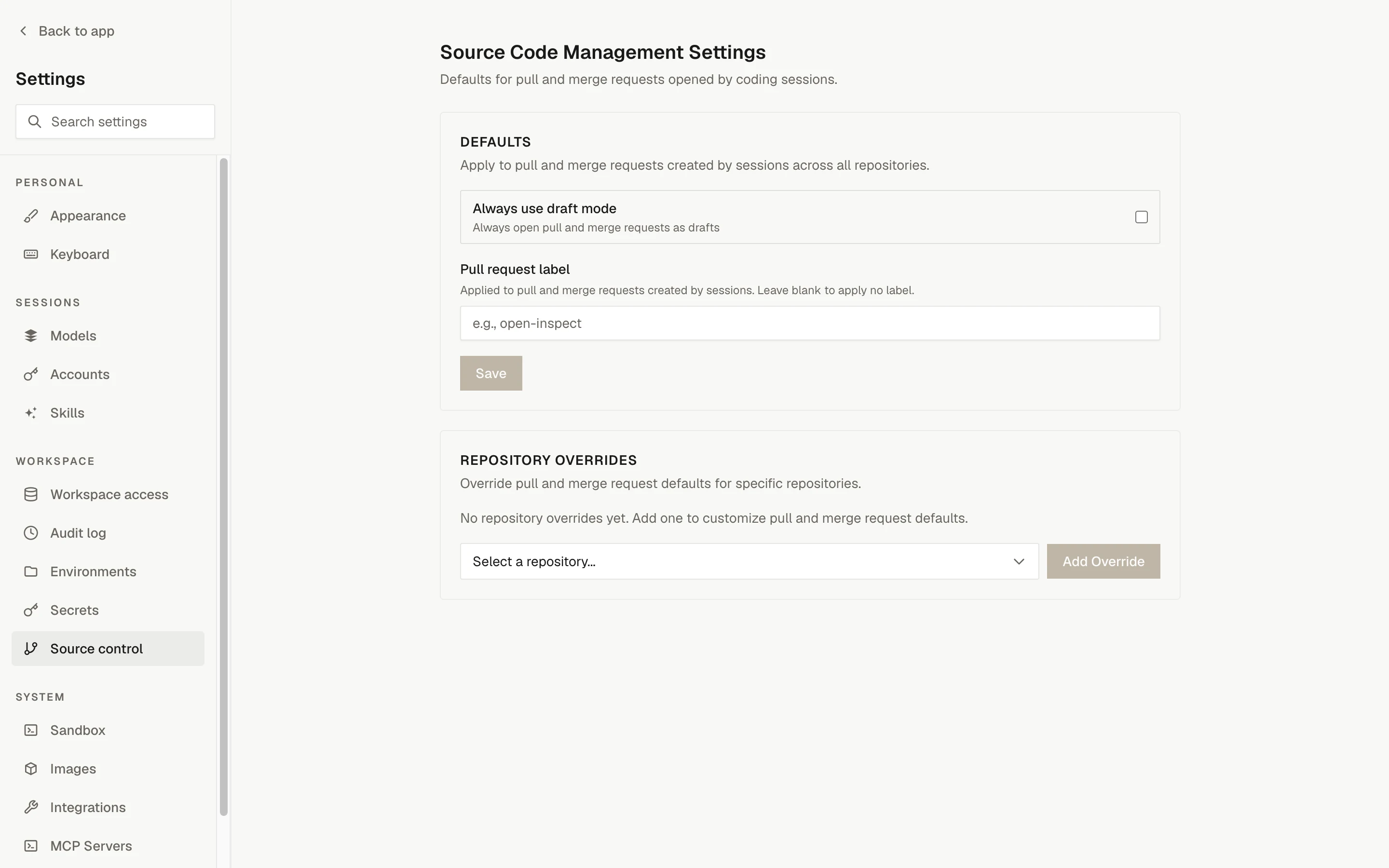
Defaults
Open Settings › Source control. The Defaults section applies to pull and merge requests created by sessions across all repositories, on both GitHub and GitLab.
| Setting | What it does |
|---|---|
| Always use draft mode | Always open pull and merge requests as drafts. |
| Pull request label | A label applied to every pull or merge request created by sessions. Leave blank to apply no label. The label cannot contain commas. |
Click Save to store the defaults. "Reset to defaults" clears the stored configuration.
Repository Overrides
The Repository Overrides section lets one repository differ from the defaults. Select a repository and click Add Override, then set either or both fields:
| Field | Options |
|---|---|
| Draft mode override | "Inherit global" (the current default is shown in parentheses), "Override: always draft", or "Override: ready unless requested" |
| Pull request label override | A label for this repository. Leave blank to use the global default; the placeholder shows the global label when one is set. |
Overrides are field-level: a field you leave blank or set to Inherit keeps following the global default, so you can override the label without touching draft mode, or the other way round. Click Save on the row to apply it, or Remove to delete the override.
How pull request creation uses these settings
When the agent calls the create-pull-request tool, OpenInspect resolves the settings for the target repository (global defaults plus that repository's overrides) and then:
- Opens the pull request as a draft when "Always use draft mode" is on, or when the agent requested a draft. When the setting is off, the agent's request decides.
- Applies the configured pull request label, if any.
Calling the tool again from the same branch updates that branch's open pull request. See reviewing changes for the review workflow.
Commit attribution
Commits and pull requests keep the human and the platform separate:
| Role | Identity |
|---|---|
| Commit author | The prompting user's source control identity when available; otherwise OpenInspect |
| Committer (and signer, when signing is on) | OpenInspect (the dedicated signing account when signing is configured) |
| Branch pusher | The GitHub App installation |
| Pull request author | The prompting user's OAuth identity when available; otherwise the GitHub App |
Commit signing
OpenInspect can sign agent-created commits with one deployment-wide OpenSSH Ed25519 key, configured under Settings › Integrations › GitHub › Commit signing. The signature attests that the OpenInspect deployment made the commit; it is not a claim that the attributed author personally signed it. GitHub repository rules remain the place to reject unsigned commits.
Create a dedicated signing account
Create or recover a dedicated GitHub account for the signing identity. It does not need repository access, because the GitHub App continues to push branches.
Generate and register the key
Generate an unencrypted OpenSSH Ed25519 key and add its public key to that account as a signing key.
Save the configuration
Enter the committer name, committer email, and the private key in the write-only form, then click "Save signing configuration". The committer email must belong to the dedicated account.
Test before enforcing
Exercise a normal commit and a history rewrite in a non-critical repository before requiring signed commits.
Once configured, the page shows the status "Configured" with the committer, the key fingerprint, the derived public key, and the last update time. It never displays the private key again.
How signing works
- The private key is stored encrypted in the control-plane database. It is never delivered to a sandbox file, environment, process, or provider snapshot; sandboxes receive only the public key.
- For each commit, a signer in the sandbox sends the unsigned commit buffer to the control plane. The buffer holds Git headers, author and committer identities, and the message; no file contents or diffs.
- The control plane decrypts the key in request-local memory and returns the signature.
- OpenInspect does not retain or log the buffer and keeps no signature ledger.
Rotation and disabling
To rotate, register the replacement public key on GitHub before replacing the private key in OpenInspect, then remove the old public key after in-flight signing requests drain. A request that already resolved the old key may complete; later requests for that fingerprint fail and retry after the next prompt refresh with the new key.
Clicking "Disable commit signing" deletes the stored key. Requests that resolve configuration afterward fail closed, and running sandboxes remove their Git signing configuration on their next prompt refresh.
Limitations
- GitHub vigilant mode shows attributed commits as "Partially verified", because the author and committer are intentionally different.
- Merge or squash commits that GitHub creates follow the repository's merge-signing behavior; the branch commit's signature does not carry onto them.
- Commit creation and history rewrites require the control plane to be available. Rewriting several commits performs one signing round trip per recreated commit, with no unsigned fallback.
- Any process in a live sandbox that holds its session token can ask the control plane to sign a commit buffer. Remote signing prevents key extraction; it does not add commit-policy enforcement.
- Sessions already running when signing support is deployed must be recreated before their commits are signed.