Sandbox settings
Configure ports, resources, timeouts, child-session limits, and cost limits for sandboxes globally, per repository, or per environment.
Sandbox settings control what each sandbox exposes (terminal, editor, desktop, tunnel ports), how much it can use (CPU, memory, lifetime, cost), and how many child sessions an agent can spawn.
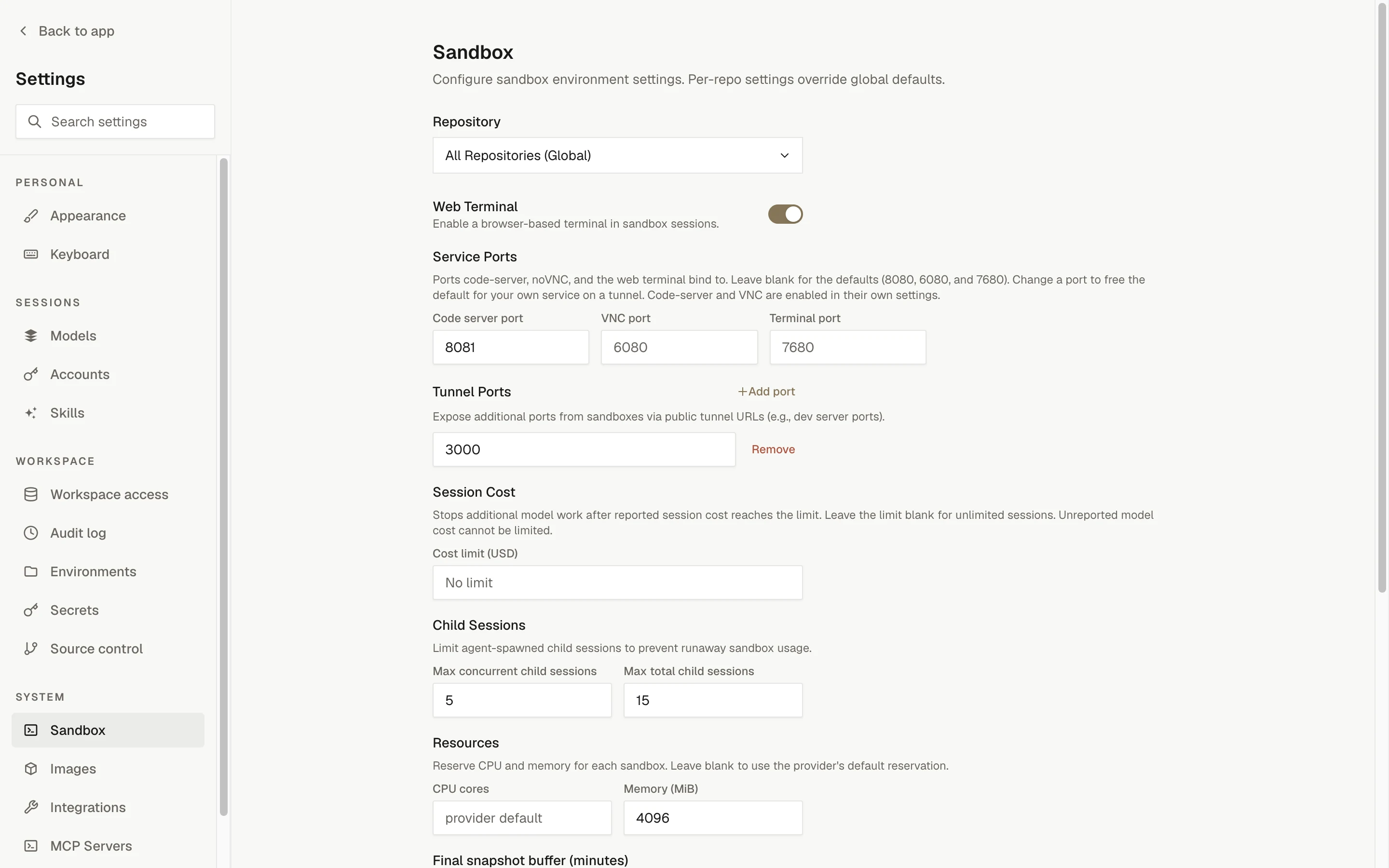
Where settings live
Settings are layered. Each layer only stores the fields you set; everything else inherits from the layer beneath it.
| Layer | Where to edit | Inherits from |
|---|---|---|
| Global defaults | Settings › Sandbox with "All Repositories (Global)" selected | Nothing (provider defaults apply for blank fields) |
| Repository overrides | Settings › Sandbox with a repository selected | Global defaults |
| Environment overrides | Settings › Environments › the environment › Sandbox | Global defaults merged with the environment's primary repository overrides |
Leaving a field blank at an override scope inherits the value from the layer beneath. The exceptions are CPU cores and memory: clearing them at a repository or environment scope explicitly uses the provider default instead of inheriting a global value.
Editing global defaults requires the integrations.manage permission; repository overrides require repositories.settings.manage, and environment overrides require environments.settings.manage. Without the permission for that scope the form is read-only.
Settings
| Setting | What it controls | Notes and limits |
|---|---|---|
| Web Terminal | Enables a browser-based terminal in sandbox sessions | Toggle. See sandbox tools for how the terminal is used in a session. |
| Code server port | Port code-server binds to inside the sandbox | Default 8080. Code-server itself is enabled under Settings › Integrations; see Sandbox tools. |
| VNC port | Port noVNC binds to inside the sandbox | Default 6080. The VNC desktop is enabled under Settings › Integrations; see Sandbox tools. |
| Terminal port | Port the web terminal proxy is exposed on | Default 7680 |
| Tunnel Ports | Extra ports exposed from the sandbox as public tunnel URLs, such as dev server ports | Up to 10 ports. Whole numbers from 1 to 65535. |
| Cost limit (USD) | Stops additional model work once the reported session cost reaches the limit | Positive amount. Blank means "No limit" at global scope and "Inherit" at override scopes. Unreported model cost cannot be limited. |
| Max concurrent child sessions | Active agent-spawned child sessions per parent session | Default 5. Must be less than or equal to the total limit. |
| Max total child sessions | Agent-spawned child sessions per parent session over its lifetime | Default 15 |
| CPU cores | CPU reserved for each sandbox | Placeholder "provider default". Positive number. Shown only on providers that support resource settings. |
| Memory (MiB) | Memory reserved for each sandbox | Placeholder "provider default". Positive whole number. Shown only on providers that support resource settings. |
| Session Timeout (minutes) | Requested lifetime of each sandbox | The sandbox lifetime, in minutes. Internally stored in whole seconds with a minimum of 1 second. Blank inherits a parent setting. Blank at every layer means 2 hours on Modal and E2B (E2B uses the operator's TTL, 2 hours by default), 45 minutes on Vercel (its maximum), and OpenComputer's own default. Shown only on providers that support timeout settings. |
| Final snapshot buffer (minutes) | Time reserved before provider expiry to stop work, preserve the filesystem, and retire the sandbox | Default 10 minutes, minimum 5 minutes. Must be shorter than the session timeout. |
| Image Build Timeout | How long a prebuilt image may take to build (clone plus setup), in seconds | Default 1800, maximum 3600. Applies to builds only; sessions are unaffected. |
Port rules apply across the whole form: the code server, VNC, terminal, and tunnel ports must all be different, and the ports reserved for internal sandbox services (5900 and 7681) cannot be used. Change a service port to free its default for your own service on a tunnel.
Click Save Settings to apply. The form reports the first validation error it finds, for example "Code server, VNC, terminal, and tunnel ports must all be different."
Provider capabilities
Resource and timeout fields are honored only by providers that support them. On other providers the form hides the field and notes that the value is configured by the deployment. Stored values for a hidden field are preserved, not deleted.
| Provider | CPU and memory | Session timeout |
|---|---|---|
| Modal | Yes | Yes |
| Vercel | Yes | Yes |
| OpenComputer | No | Yes |
| E2B | No | Yes |
| Daytona | No | No |
See sandbox providers for what each provider offers.
When changes apply
Sandbox settings are resolved when a sandbox is created and when an image build starts. A sandbox that is already running keeps the settings it was created with; the next sandbox for the same target, and the next build, use the new values.
The session cost limit can also be adjusted for one session from the Budget section of the session sidebar. That change applies only to that session. See spend limits.